Order Form Redesign
Redesigned a cross-team order intake into a structured form that captures fulfillment context up front — so orders go through on the first pass instead of stalling for follow-up.
The workflow and where it broke
My department places orders that get shipped by our warehouse. The customer support team gets the information about what the customer needs and sends it to me.
A few years ago, request volume was high, and the intake faithfully captured what the customer said. If a customer said, “I want X, Y, and Z,” the request relayed “they want X, Y, and Z” — but it had no field for the context fulfillment actually needed to ship the order.
I’d get orders that didn’t have:
- Who was supposed to receive the equipment
- What other things they might need to go with it (e.g. required equipment)
- The date by when they needed it
- Whether they needed us to arrange someone to come install the equipment
Recovering the missing pieces meant reconstructing a phone conversation days after it happened — and by then the details often weren’t recoverable. Orders would sit. The customer’s needs weren’t getting met.
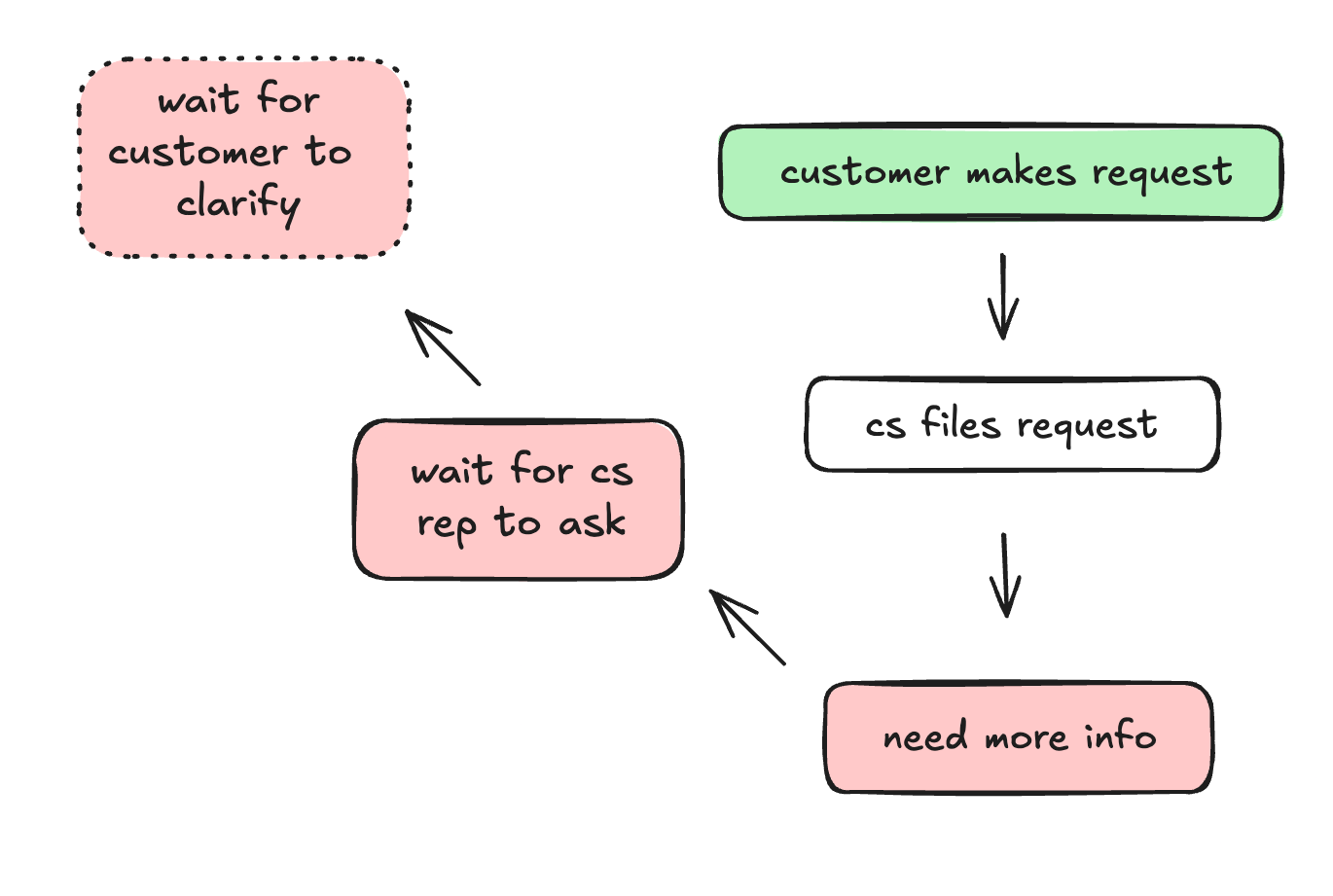
The insight
No one was withholding context — the request simply never asked for what fulfillment needed.
A fix that depended on people remembering wouldn’t hold. It had to live in the request itself, so the right context came along by default.
The redesign
After a particularly rough season of this, I partnered with our Salesforce project manager. I designed the form’s logic and questions. She built it in Salesforce.
The principle: rather than just ask what the customer wanted, we’d gather the context.
The form requires:
- Type — parts, install, or both — drives the conditional fields
- Description — free-text for context not captured by the structured fields
- Contact info — defaults to the venue’s primary contact, with override
- Priority / next event — the next date the venue would be used, so I knew how urgent it was
- Conditional info — shown based on type. For parts: our part category, not the customer’s words. For install: site details (lift Y/N, install reason, etc.)
Matching a customer’s plain-language description to a specific part is hard for anyone who doesn’t handle the equipment daily — it’s a translation problem. So we also added part reference photos into the form, to make it easy to match what the customer described with what they actually needed.
After launch, there were a few tweaks we made based on use. For example, the contact name field started as editable text, but people would put email addresses or a CC they also wanted contacted. So we made it a searchable object and let people create a new contact if the one they needed wasn’t there.
The overall result was that you couldn’t make a request without filling out the form, and you couldn’t fill out the form without providing the relevant information.
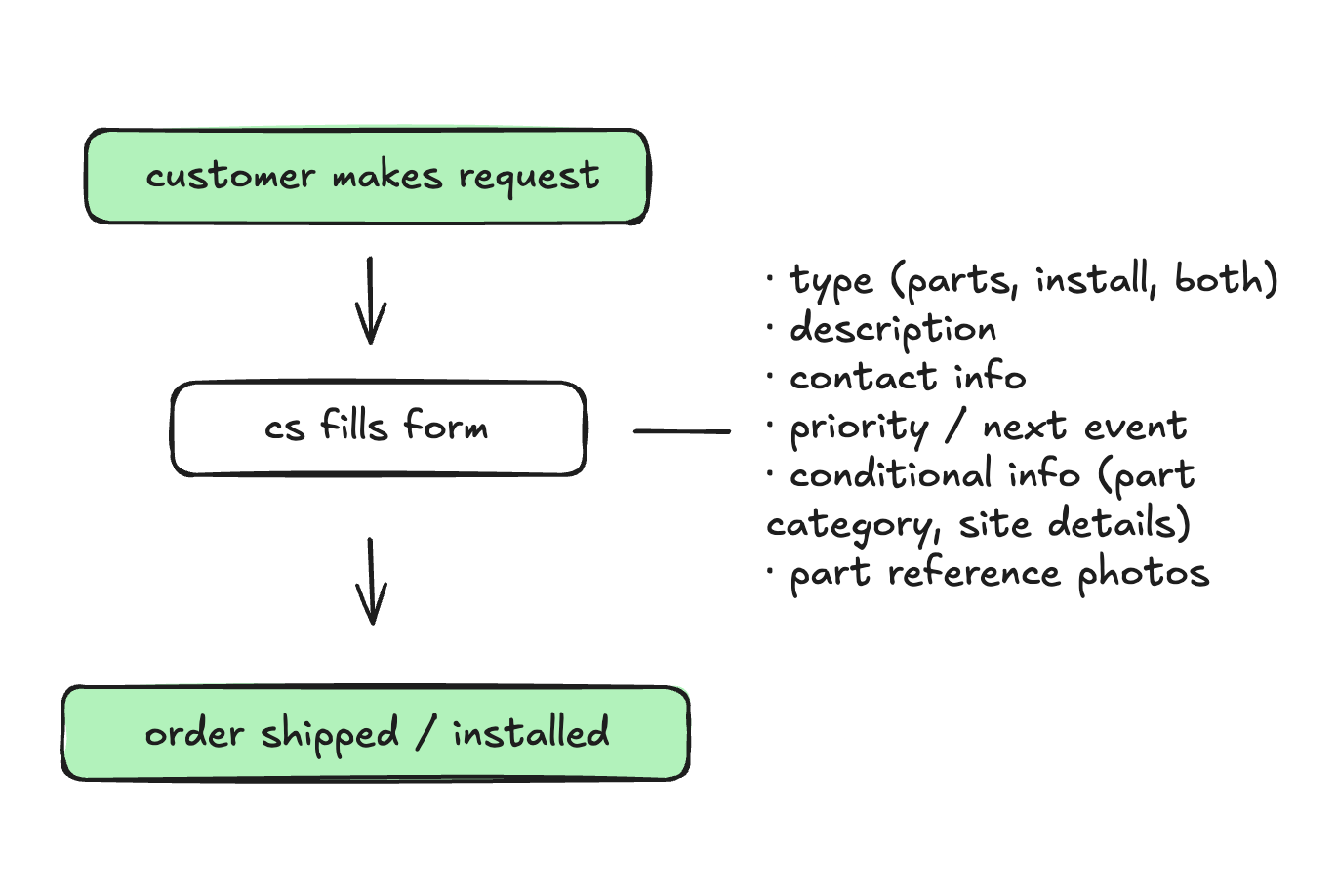
What changed
Once the form rolled out, most orders started going through immediately, because I had the context I needed without having to chase it. CS reps intuitively learned the pattern: if I don’t gather this information now, I’m going to have to go back and get it — or my request won’t go through.
Per Salesforce data at the time, order processing time dropped by ~24%. The form is still in use today.
The honest limit: an occasional request still comes in as “ship me one of everything, please.” But the form turned the majority of cases into something relevant and actionable — it gave people an easy way to supply what was needed, and the requests improved accordingly.
Reflection
This project gave me the chance to improve the order process and show (rather than tell) the team what we needed further down the install/order pipeline. Once the CS team could see what to provide, they did.