Budget Itemizer
A free, local-first desktop app that turns receipts into itemized YNAB transactions — no cloud, no subscription, no manual data entry.
The problem
Every time I sat down to work on my finances in YNAB, I ran into the same problem: I still couldn’t figure out where my money was going. I’d go to Walmart and buy, let’s say, apples, Windex, mulch, batteries… all kinds of things, none of which belong in the same budget category. But YNAB only sees one line item: “$155.14, Walmart.” That’s not enough information to make informed decisions about spending.
The sample transaction log below demonstrates the problem: without per-item costs mapped to real categories, the core promise of a budgeting tool — knowing where your money goes — falls apart. Every trip to Walmart is “Groceries”, every order from Amazon is “Home Goods”, and so on.
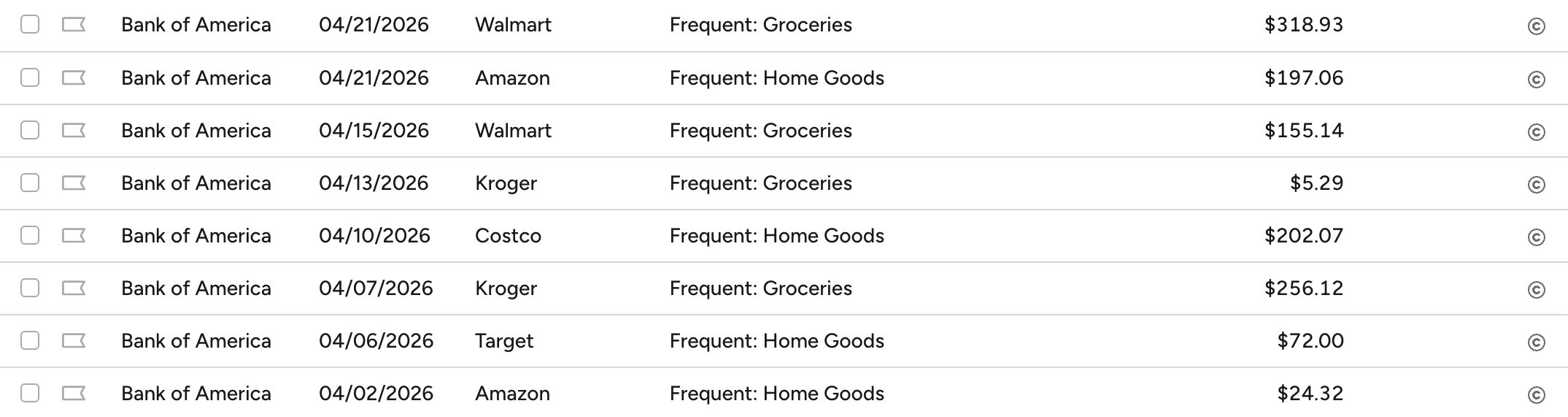 Every store lumped into one category — the default state of any unsplit transaction.
You can see in my spending chart, the Groceries category has absorbed a huge amount of spending — even if some of the purchases didn’t really fall into that category.
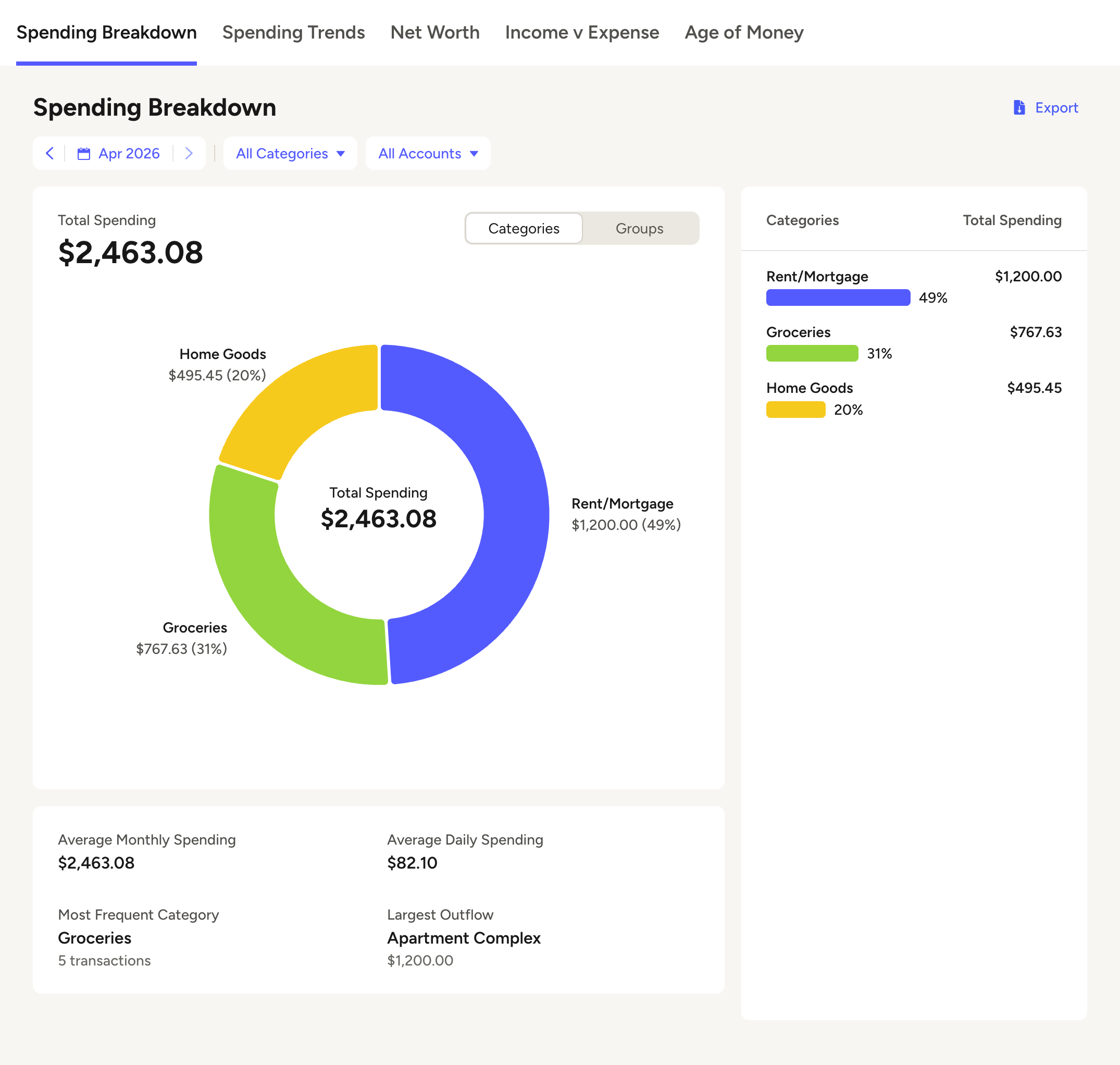 Illustrative example — three categories absorb almost all spending.
Split transactions are already an excellent YNAB feature, so that isn’t the issue. The problem is that splits require you to already know what’s in the transaction, so most people just don’t bother. The tool removes that friction.
What exists today
I looked into available options for parsing orders. I found a few, all run by third-party companies and all charging a fee:
- Snapt — Uses GPT-4o and Gemini (cloud). Runs through a Telegram bot. Sends your receipt data to external servers.
- AutoSlip — Cloud-based AI, web platform, paid early-bird pricing.
- Receipts for YNAB — Uses Apple Intelligence on-device, which is promising for privacy. But it’s iOS-only, requires an iPhone 15 Pro or newer, and costs $4.99/month.
- Receipt Reader AI — Cloud-based, web, charges for more than 10 scans a month.
I also found one developer who had built a receipt importing tool, but it required a Gemini subscription and Docker setup — too much technical know-how for the average user.
I couldn’t find a free, open-source, local-first receipt scanner for YNAB. So I set the constraints I’d build to:
- Free. Not freemium, not “bring your own API key.” Actually free.
- Local. All processing on the user’s machine. No data leaves the device.
- Zero-config. A user shouldn’t need to know what an LLM is. Connect YNAB, drop a receipt, done.
Three failed approaches
Attempt 1: Browser extension with pattern matching
My first instinct was a lightweight browser plugin — maybe even mobile. Retailers like Walmart, Target, Costco, and Amazon all have online portals where you can view receipts digitally. I tried to extract that data directly from the page and send it to YNAB.
So I started trying to build a prototype. I wasn’t using machine learning — I was crudely reconstructing pattern recognition from the DOM. The actual page structure can be very complex with arcane HTML built from various rendering methods, often producing unreadable code that gives no real indication of structure. What ended up working was hard-coded, brittle structure recognition (this div, that id) specific to the retailers I was using. It was only going to go so far — those structures could change at any time, and there are millions of small retailers and Shopify stores. A constant game of whack-a-mole.
What I learned: The value was in seeing the receipt — its spatial layout carries relationships the DOM tree doesn’t.
Attempt 2: PDF capture + full LLM extraction
The next solution was to capture the receipt as a PDF, which preserves the visual hierarchy. Then I tried using a single LLM call to extract everything — “give me the items, prices, and totals in this format.”
This proved overwhelming, at least on my hardware. I have an M3 MacBook Air with 24GB of RAM, and it just took too long and often gave the wrong answer. If it wasn’t viable on my machine, it certainly wouldn’t help people with less powerful hardware or less patience.
What I learned: Asking a small LLM to do everything was the wrong approach — it needed a narrower job.
Attempt 3: The split that worked
I decided to split the process into the components best suited to each tool. The LLM identifies the pieces of relevant information on the page; deterministic code finds the numerical data associated with each — the price, tax, shipping, and other financial details. The app then does arithmetic using item prices and the total, making sure they add up. If they don’t, it runs a process of elimination to figure out what was misparsed. This is all in code logic — no LLM processing for the math. It’s not perfect, but it catches a lot of edge cases.
What I learned: Use each tool for what it’s good at — the LLM reads the words, code does the math. Not a better model or a smarter prompt; the right job for each part.
How the tool works
The user saves a receipt PDF — either by dragging it into the app or dropping it into a watched folder. The app reads the PDF, identifies the line items, predicts a category for each one based on the user’s existing budget categories, and presents the result for review. Once approved, the transaction lands in YNAB as a split, with each line item in its proper category. No subscription, no cloud, no manual data entry.
Solution & design
I built this project with Claude Code — I held the product vision and made the design decisions; Claude wrote the code and helped me think through technical tradeoffs.
The result is a desktop app: save a receipt, optionally review, and import to budget.
The design contract underneath all of this is simple: the line items have to add up to the receipt total, exactly. If they don’t, the import doesn’t go through. A budgeting tool that splits a transaction into categories that don’t reconcile is worse than no tool at all — it’s misrouted money the user thinks is correctly categorized. So accuracy isn’t a goal, it’s a gate.
Designing the import flow
The import process went through some stages of evolution. Initially, there wasn’t much to see — the app would just display a line item saying something got processed, and wait for you to approve it.
Approval before import was very important to me. If someone was focused enough on their money to use a secondary import tool, they surely cared about the details being right.
But very quickly I also wanted more visibility into what was happening, and into the processing history. I started working on a full detail view where you could see all of the extracted data — but it wouldn’t show anything until processing was over. Until then, it was just a spinning loader wheel. So we switched to a process that parsed in stages and displayed the details as they were received.
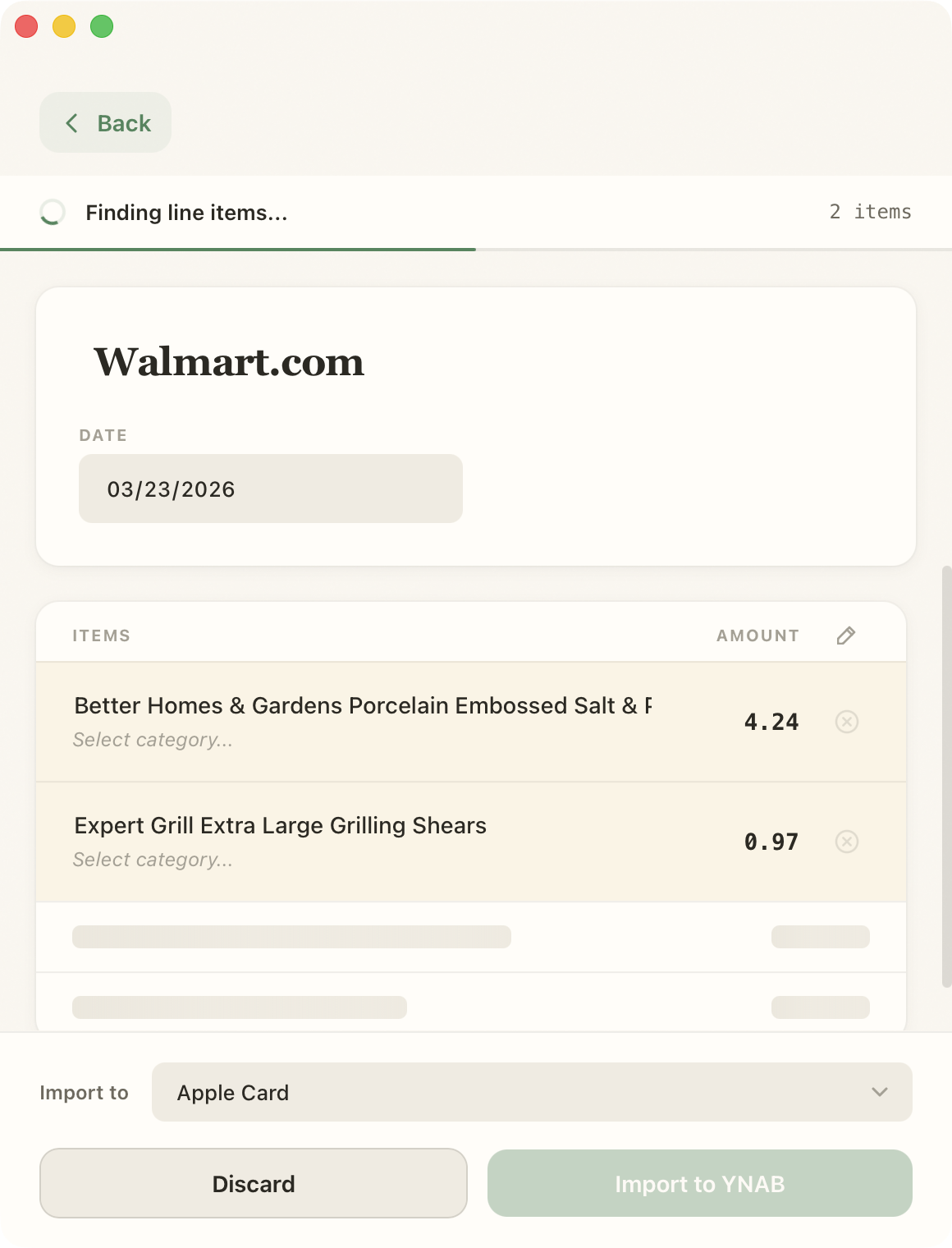 Items appear as they’re parsed; placeholders mark what’s still loading.
That way, the user would feel a sense of progress, even if they were just watching and waiting.
Then, when I was running imports on a few test receipts multiple times, I realized I still wanted updates without having to click in to the full view. So I added a simple progress bar to the import item, so that you could see how far you were without having to know the details.
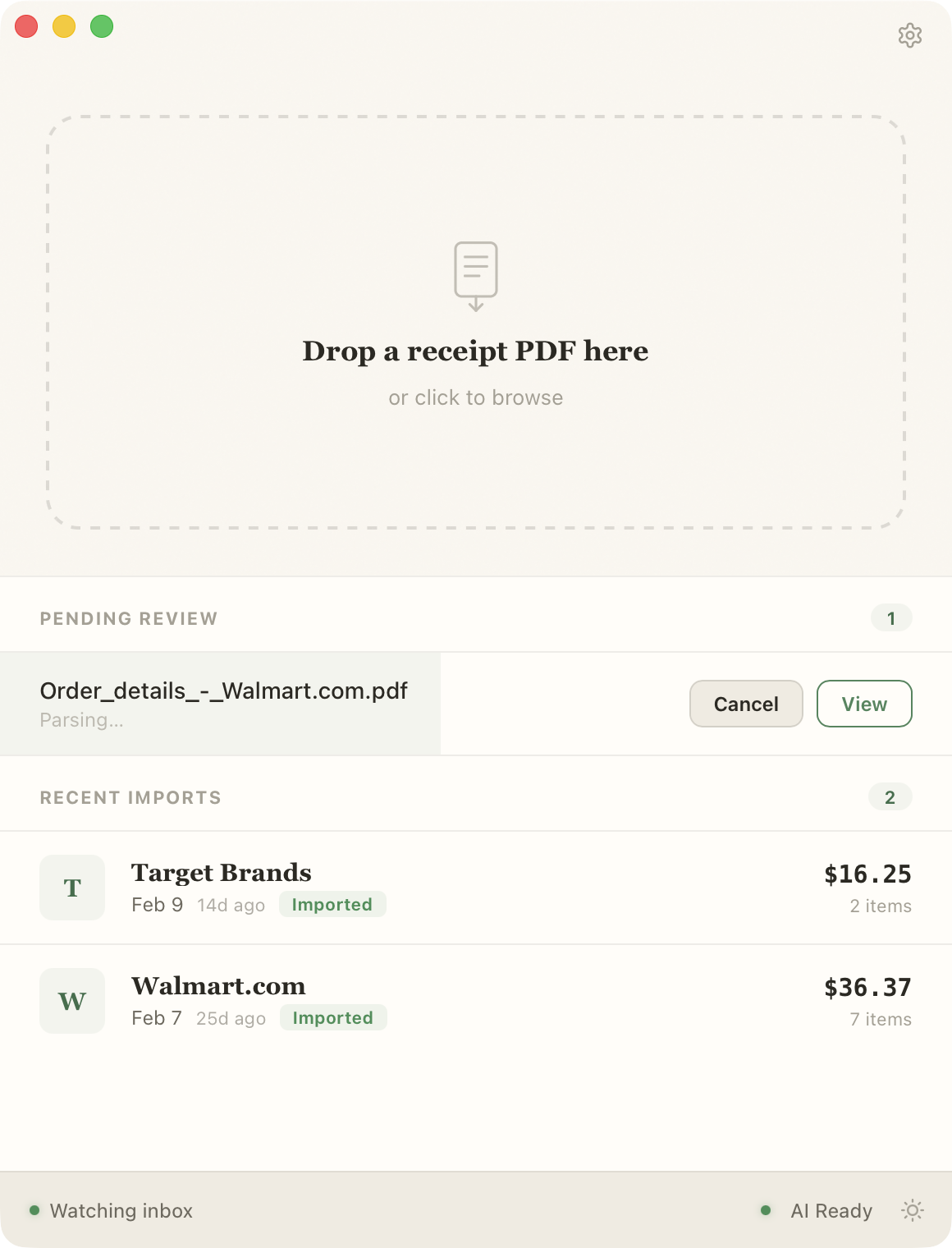 The pending item shows progress without making the user click in for the detail view.
In both instances, setting expectations eased the tension of waiting.
Finally, I added the ability to auto-import for those who want to save time and have built enough trust in the tool.
Aligning with how the user thinks about money
I realized early on that the app needed to match however the user already thought about money. If the app didn’t help you use your categories, the user was still dealing with a major pain point. So I set up pulling the categories directly from the budget and asked the LLM to predict the closest one for each item title.
I also added matching across accounts, so picking the wrong one wouldn’t block the import. And some accounts do not make regular purchases, or shouldn’t even be in your picklist (your 401k, your store credit card), so I made it so you can disable whichever ones you like.
Foreground or background
I wanted the app to work however the user wanted: foreground or background. So while it started as a drag-and-drop app you actively engage with, I added a folder watching feature so you can just close the application window, save files to the right location, and it works in the background.
Key build decisions
Why I dropped Apple’s Foundation Model
I started with Apple’s Foundation Model — an on-device model already shipping on the user’s hardware. No download, no setup, no extra disk space. For the constraints I’d set (free, local, zero-config), it looked perfect.
Then I tested it on a real receipt that included a murder mystery book, and the model refused to return the title. This is a known guardrails issue: the content filter blocks anything that brushes a sensitive topic, even when the request is just “what’s on this receipt.” There’s an official workaround — a permissive setting that turns the guardrails off — but Apple notes the model can still refuse even with it disabled.
I didn’t pursue it. Receipts are open-ended — people buy anything — and I couldn’t be sure a guardrails-off setting would hold across every receipt a user might throw at it, especially with Apple saying refusals can still happen. For a budgeting tool the failure mode is bad: the item silently drops and the user never knows it was missing. Validating a maybe-fix across an unbounded input space wasn’t a good use of the time I had — a model I controlled would just do the job, so I brought my own and moved on.
Model selection
The constraints stayed the same: I needed something small enough to run quickly on a 24GB MacBook Air and accurate enough to be useful. After testing, I went with Llama 3.1 8B — a 4-bit quantized model that moved fast enough for the processes I was giving it while still returning accurate information. That was basically all I was looking for: what is the smallest, fastest model I can use that will still give me usable data? It’s my hypothesis that a very efficient model could be built for this task specifically — but using off-the-shelf models that are available to anyone, I can already get usable results.
The prompt also required per-model tuning — different models expect different prompt structures, and the interplay between model, prompt, and inference engine all affect output quality. That added complexity made it extra important to find the best possible default, so the user wouldn’t need any configuration.
Testing guardrails
My primary metrics were simple: speed of import and whether the numbers matched the receipt. Those two things determined whether the tool was working. A lot of the iteration was around model selection, prompt tuning, and inference configuration to optimize both.
Results
After splitting transactions across the categories that actually match each line item, the same month of spending tells a different story. Groceries drops from $767 to $439 — not because spending changed, but because purchases that were never groceries finally land where they belong. Tools and Fuel show up as visible categories that didn’t exist in the report before. Now I can see whether I’m overspending on food or just bad at categorizing receipts.
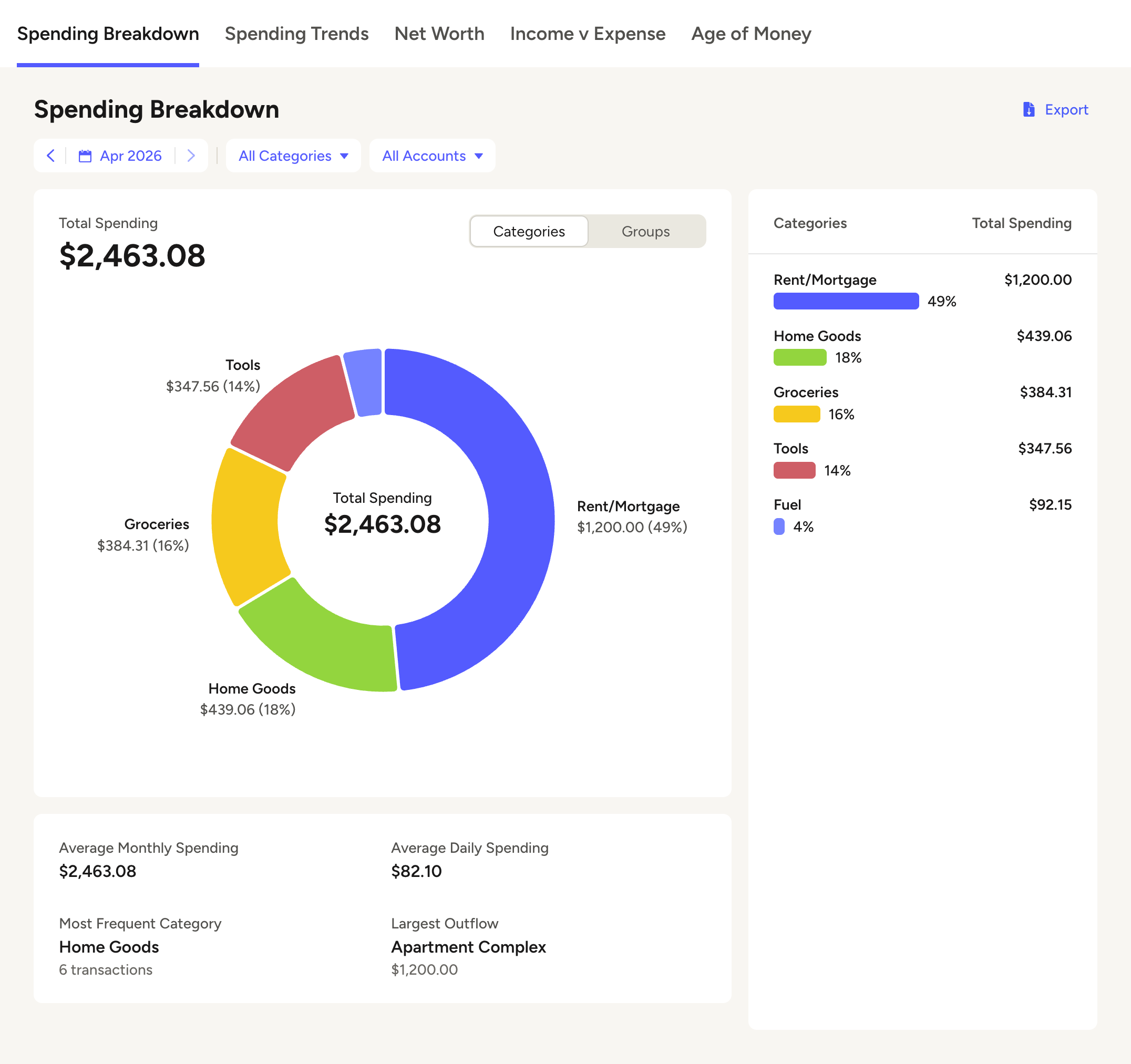 Illustrative example — after itemization, spending lands in categories that actually match.
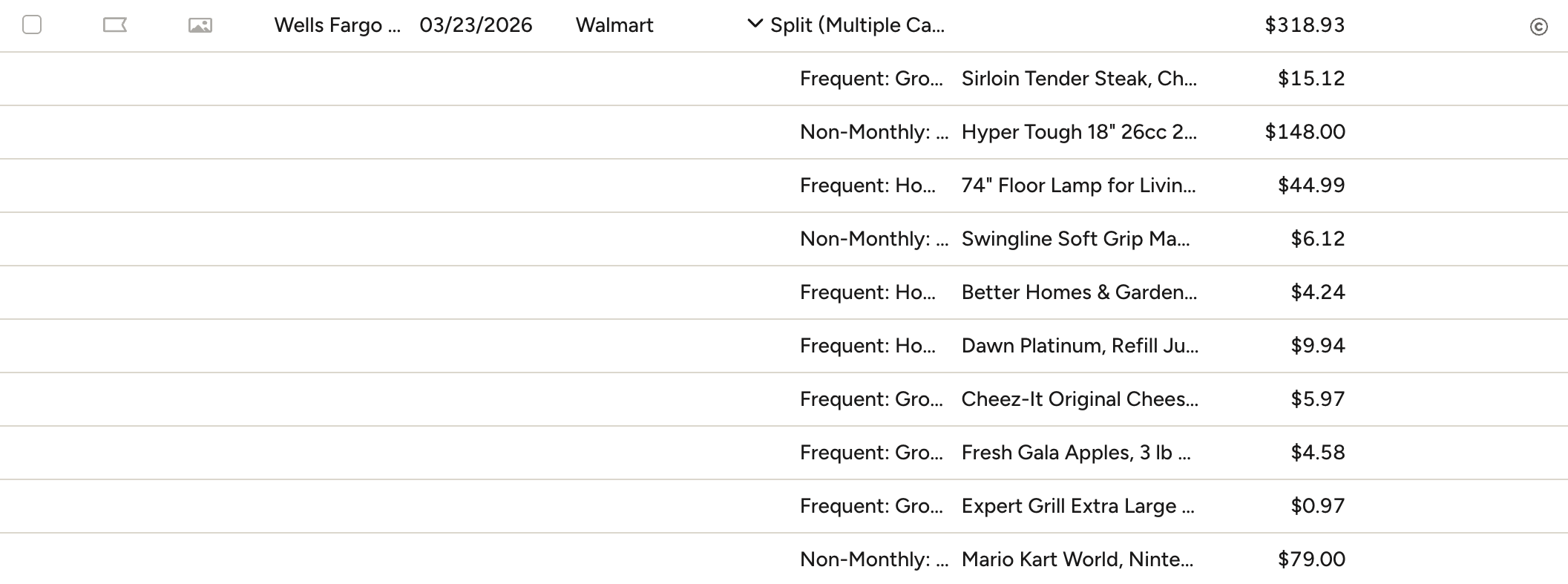 The artifact the whole pipeline exists for: one Walmart transaction the tool itemized, expanded in YNAB into per-item subtransactions that each land in their own category and reconcile exactly to the $318.93 total.
Reflection
Building this pushed me to prioritize accuracy over build expediency, scope tools to where they’re effective, and design around the user. I’ve tested it on a lot of my own data; the real test is other people’s receipts and budgets and categories — that’s where it either holds up or tells me what to redesign.